


Table of Contents
Table of Contents
ToggleWhat is Ansible?
Ansible is an open source, command-line IT automation software application written in Python. It can configure systems, deploy software, and orchestrate advanced workflows to support application deployment, system updates, and more.
Ansible can manage powerful automation tasks and can adapt to many different workflows and environments. At the same time, new users of Ansible can very quickly use it to become productive.
You can use Ansible to deploy applications, for configuration management, for workflow automation, and for network automation.
How does Ansible Work?
Ansible works by connecting to your nodes and pushing out small programs, called “Ansible modules” to them. Ansible then executes these modules (over SSH by default), and removes them when finished. Your library of modules can reside on any machine, and there are no servers, daemons, or databases required.
The picture given below shows the working of Ansible.
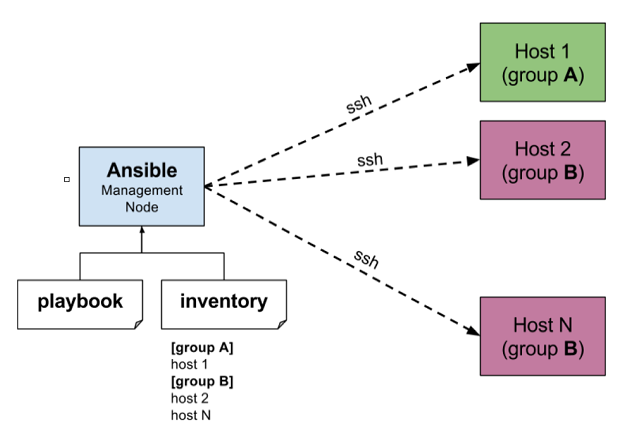
The management node in the above picture is the controlling node (managing node) which controls the entire execution of the playbook. Its the node from which you run the playbook. The inventory file provides the list of hosts where the Ansible modules needs to be run and the management node does a SSH connection and executes the small modules on the hosts machine and installs the product/software.
Beauty of Ansible is that it removes the modules once those are installed so effectively it connects to host machine , executes the instructions and if its successfully installed removes the code which was copied on the host machine which was executed.
Use-cases of Ansible:
A) Provisioning environments:- Suppose you have a web app that you need to deploy and you need the environment for that so Ansible can provision environments for you on various platforms like Public Cloud, Private Cloud, and even Baremetal.
B) Configuring servers:- The Ansible is used mostly for this purpose which is configuration management. In companies, you need to configure the servers daily for various purposes like hosting the website. So ansible can configure your servers as per requirement and start the services for you with just one click.
C) Firewall configurations:- With ansible, you can create firewall rules and apply them to multiple hosts to make sure that your servers are secure and only required ports are open and listening.
D) Security Patches:- The updates and security patches are very important to make sure that your servers are protected against the latest cyber-attacks. With Ansible, you can make sure that all your packages are the latest and also apply security patches to your servers.
E) Application deployment:- With ansible, you can automate the process of application deployment easily and fastly.
There are hundreds of other usecases which ansible can solve for you but these are some of the most common use cases.
How to install Ansible in Linux:
Ansible is simple to install. The Ansible software only needs to be installed on the control node (or nodes) from which Ansible will be run. Hosts that are managed by Ansible do not need to have Ansible installed. This installation involves relatively few steps and has minimal requirements.
The control node should be a Linux or UNIX system. Microsoft Windows is not supported as a control node, although Windows systems can be managed hosts.
Python 3 (version 3.5 or later) or Python 2 (version 2.7 or later) needs to be installed on the control node.
You can install the latest release through Apt, yum, pkg, pip, OpenCSW, pacman, etc
Install Ansible using Apt on Ubuntu Machine:
For installing Ansible you have to configure PPA(personal package archive) on your machine. For this, you have to run the following line of code
sudo apt-get update
sudo apt-get install software-properties-common
sudo apt-add-repository ppa:ansible/ansible
sudo apt-get update
sudo apt-get install ansible
After running the above line of code, you are ready to manage remote machines through Ansible. Just run ansible –version to check the version and just to check whether Ansible was installed properly or not.
Install Ansible using dnf on RHEL Machine:
If you are using the version with limited support provided with your Red Hat Enterprise Linux
Enable the Red Hat Ansible Engine repository.
subscription-manager refresh
subscription-manager repos  --enable ansible-2-for-rhel-8-x86_64-rpms
Install Red Hat Ansible Engine.
dnf install ansible -y
You can refer also Ansible public documentation page https://docs.ansible.com/projects/ansible/latest/installation_guide/intro_installation.html to install Ansibe from official website.
Please visit our official website https://linuxgktech.com/ansible/ to know more about Ansible.
